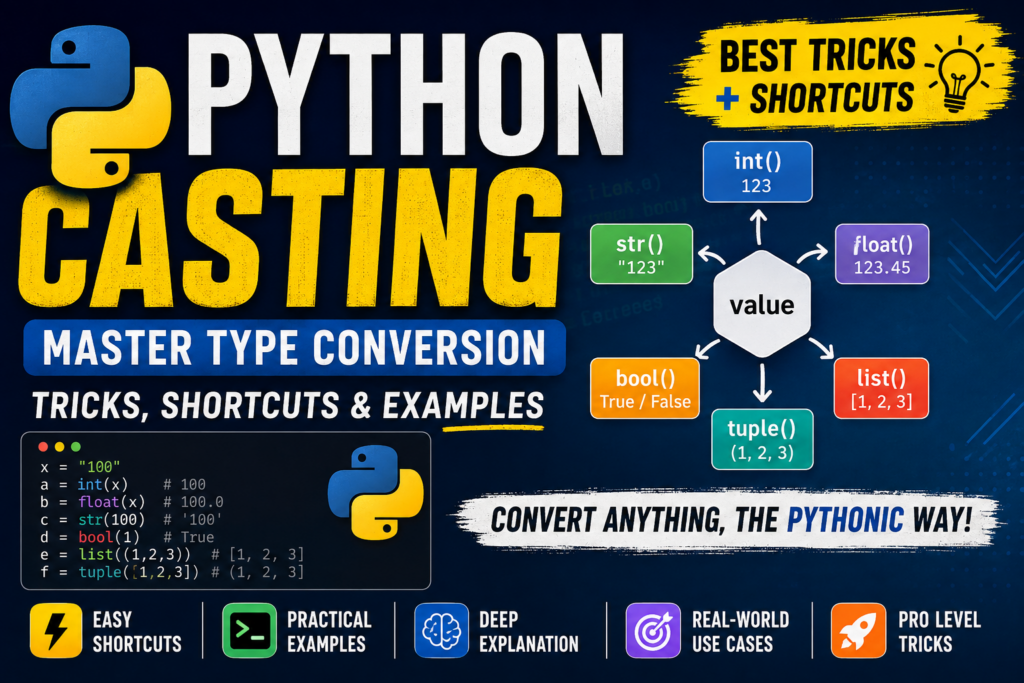

Python Casting is one of the most important skills every Python developer should understand. It allows you to convert a value from one data type to another—for example, converting a string into an integer, an integer into a float, or a list into a tuple.
Python makes type conversion remarkably simple through built-in functions such as int(), float(), str(), bool(), list(), tuple(), set(), and dict().
In this guide, we’ll go beyond basic casting and explore professional Python casting techniques, shortcuts, practical patterns, edge cases, and modern coding tricks you can use in real projects.
What Is Casting in Python?
Casting means converting a value from one data type to another.
For example:
age = "18"

age = int(age)

print(age)
print(type(age))
Output:
18
<class 'int'>
Here, "18" is originally a str, but int() converts it into an int.
Basic Syntax
new_value = target_type(value)
Examples:
int("100")
float("10.5")
str(500)
bool(1)
Why Is Python Casting Important?
Casting becomes especially useful when working with:
- User input
- Forms
- APIs
- JSON data
- Databases
- Configuration files
- Mathematical calculations
- CSV files
- Command-line arguments
- Web applications
Remember:
input()
always returns a string.
So this:
age = input("Enter your age: ")
produces a string even if the user enters:
18
To perform numerical operations, convert it:
age = int(input("Enter your age: "))
1. String to Integer — The Most Common Casting Trick
The simplest conversion is:
number = int("100")

print(number)
Output:
100
Now Python treats number as an integer.
print(type(number))
Output:
<class 'int'>
Professional Shortcut
Instead of:
value = input()
value = int(value)
use:
value = int(input())
This is cleaner and more readable.
2. String to Float
Use float() when a string contains a decimal number.
price = float("99.95")

print(price)
Output:
99.95
You can also convert an integer:
price = float(100)

print(price)
Output:
100.0
Useful Pattern
temperature = float(input("Temperature: "))
This is common in calculators, finance applications, scientific programs, and data processing.
3. Integer to Float
Python can easily convert an integer into a floating-point number:
x = 10
y = float(x)

print(y)
Output:
10.0
Shortcut
y = float(10)
4. Integer to String
Use str() to convert a number into text.
age = 18
message = "Age: " + str(age)

print(message)
Output:
Age: 18
However, modern Python gives you an even better option.
Modern Python Trick: f-Strings
Instead of:
message = "Age: " + str(age)
prefer:
message = f"Age: {age}"
This is cleaner and easier to maintain.
5. Float to Integer
You can convert a float to an integer:
x = int(19.99)

print(x)
Output:
19
Important!
int() does not round the number.
It removes the fractional part toward zero.
int(9.99)    # 9
int(-9.99)   # -9
So don’t use int() when your goal is mathematical rounding.
Use:
round(9.99)
instead.
6. Boolean Casting
Python’s bool() converts values into True or False.
print(bool(1))
print(bool(0))
Output:
True
False
A useful rule is:
Generally Truthy
bool(10)       # True
bool(-5)       # True
bool("hello")  # True
bool([1, 2])   # True
Generally Falsy
bool(0)     # False
bool("")    # False
bool([])    # False
bool(())    # False
bool({})    # False
bool(None)  # False
7. The Powerful bool() Shortcut
Instead of:
if len(items) > 0:
    print("Items found")
you can often write:
if items:
    print("Items found")
This works because Python evaluates the list’s truth value.
For example:
items = [10, 20]

if items:
    print("List is not empty")
This is a very common Pythonic style.
8. String to Boolean — Important Trap
This is one of the most important casting tricks.
Consider:
print(bool("False"))
Output:
True
Why?
Because "False" is a non-empty string.
Python does not interpret the text "False" as the Boolean value False.
The same happens here:
bool("0")      # True
bool("False")  # True
bool("No")     # True
Don’t Do This for User Input
is_active = bool(input())
If the user enters:
False
the result is still:
True
9. Safe String-to-Boolean Conversion
For controlled input, you can explicitly interpret accepted values.
value = input().strip().lower()

is_active = value in {"true", "1", "yes", "y", "on"}
Now:
true
yes
1
on
become True.
Everything else becomes False.
This approach is much safer than simply using bool().
10. List Casting
You can convert several iterable objects into a list.
numbers = tuple((1, 2, 3))

numbers = list(numbers)

print(numbers)
Output:
[1, 2, 3]
You can also convert a string:
letters = list("Python")

print(letters)
Output:
['P', 'y', 't', 'h', 'o', 'n']
Important Trick
A string is iterable, so:
list("123")
produces:
['1', '2', '3']
It does not produce:
[123]
11. Tuple Casting
Use tuple() to convert an iterable into a tuple.
numbers = tuple([1, 2, 3])

print(numbers)
Output:
(1, 2, 3)
A useful shortcut is:
tuple("ABC")
which produces:
('A', 'B', 'C')
12. Set Casting — Remove Duplicates Quickly
One of Python’s most useful casting tricks is:
numbers = [1, 2, 2, 3, 3, 4]

unique = set(numbers)

print(unique)
Result:
{1, 2, 3, 4}
One-Line Duplicate Removal
unique = set(numbers)
This is extremely convenient when you only need unique values.
Important
A set is unordered, so don’t rely on its iteration order.
If you need to preserve the original order while removing duplicates, a different technique is better:
unique = list(dict.fromkeys(numbers))
13. Dictionary Casting
A dictionary can be created from key-value pairs.
pairs = [("name", "Alex"), ("age", 18)]

person = dict(pairs)

print(person)
Output:
{'name': 'Alex', 'age': 18}
This is especially useful when processing structured data.
14. The dict() Casting Shortcut
You can convert a list of pairs directly:
data = [
    ("language", "Python"),
    ("version", 3)
]

result = dict(data)
Now:
print(result["language"])
produces:
Python
15. Casting Multiple Values with map()
Suppose you receive numbers as text:
data = "10 20 30 40"
Instead of converting every value manually:
numbers = data.split()

numbers = [
    int(x)
    for x in numbers
]
you can use:
numbers = list(map(int, data.split()))
Result:
[10, 20, 30, 40]
This Is a Classic Python Shortcut
list(map(int, input().split()))
It converts space-separated input directly into integers.
For example:
10 20 30
becomes:
[10, 20, 30]
16. Modern Alternative: List Comprehension
Although map() is concise, list comprehensions are often very readable.
numbers = [int(x) for x in input().split()]
This is excellent when you need additional logic.
For example:
numbers = [
    int(x)
    for x in input().split()
    if int(x) > 10
]
For simple direct conversion, map() is perfectly suitable.
17. Casting with type()
Use type() to inspect the resulting type.
x = int("42")

print(type(x))
Output:
<class 'int'>
You can inspect multiple values:
values = [10, 2.5, "Python", True]

for value in values:
    print(type(value).__name__)
Output:
int
float
str
bool
Modern Debugging Trick
print(type(value).__name__)
is often cleaner than:
print(type(value))
when you only want the type name.
18. isinstance() vs type()
For checking whether an object belongs to a type, isinstance() is generally more flexible.
value = 100

print(isinstance(value, int))
Output:
True
You can check multiple types:
value = 10.5

print(isinstance(value, (int, float)))
Output:
True
Professional Rule
Use:
isinstance(value, int)
when you want to ask:
“Is this value an instance of this type?”
Use:
type(value) is int
when you specifically need an exact type check.
19. Numeric Casting with Base Conversion
int() has a powerful second argument: the number base.
number = int("1010", 2)

print(number)
Output:
10
The string "1010" is interpreted as binary.
Binary → Decimal
int("1010", 2)
Hexadecimal → Decimal
int("FF", 16)
Octal → Decimal
int("17", 8)
This is extremely useful when working with binary data, hexadecimal values, and low-level programming.
20. Decimal → Binary
Use bin():
print(bin(10))
Output:
0b1010
Decimal → Hexadecimal
print(hex(255))
Output:
0xff
Decimal → Octal
print(oct(10))
Output:
0o12
21. The Round-Trip Casting Trick
Python can convert between representations.
Example:
number = 255

hex_value = hex(number)

print(hex_value)
Output:
0xff
Convert it back:
number = int("ff", 16)

print(number)
Output:
255
This is useful for working with hexadecimal identifiers, colors, protocols, and low-level data.
22. Casting None
None represents the absence of a value.
value = None

print(bool(value))
Output:
False
But don’t assume every conversion accepts None.
For example:
int(None)
raises an exception.
A safer approach is to handle missing values explicitly:
value = None

number = int(value) if value is not None else 0
23. Handling Invalid Casting with try/except
Casting can fail.
For example:
number = int("hello")
raises:
ValueError
For user input, handle the error:
try:
    number = int(input("Enter a number: "))
    print(number)
except ValueError:
    print("Please enter a valid integer.")
This is much more professional than allowing the program to crash.
24. The int(float()) Trick
Suppose you receive:
value = "19.99"
This won’t work:
int(value)
because "19.99" isn’t an integer string.
Instead:
number = int(float(value))
Result:
19
Be Careful
This truncates the decimal portion.
If you actually want rounding, use:
round(float(value))
25. Casting in Function Arguments
You can cast values directly when calling a function.
def square(number):
    return number ** 2

result = square(int("8"))

print(result)
Output:
64
This keeps conversion close to where the converted value is needed.
26. Casting with Type Hints
Type hints do not automatically cast values.
For example:
def calculate(age: int):
    return age + 1
Calling:
calculate("18")
doesn’t automatically convert "18" into 18.
You still need:
calculate(int("18"))
Important Concept
Type hints communicate intended types.
They are not automatic runtime casting.
27. A Powerful Input-Casting Pattern
Instead of repeatedly writing:
int(input())
float(input())
you can create reusable functions.
def get_int(prompt):
    while True:
        try:
            return int(input(prompt))
        except ValueError:
            print("Enter a valid integer.")
Now:
age = get_int("Age: ")
This makes larger programs cleaner and easier to maintain.
28. Casting with enumerate()
Sometimes you need indexes as integers while working with converted values.
numbers = [int(x) for x in "10 20 30".split()]

for index, number in enumerate(numbers):
    print(index, number)
Output:
0 10
1 20
2 30
This is a clean combination of conversion and iteration.
29. Casting JSON-Like Data
When working with external data, values may arrive as strings.
For example:
data = {
    "age": "18",
    "score": "95.5"
}
Convert them:
age = int(data["age"])
score = float(data["score"])
Now your application can perform numerical operations safely.
Professional Tip
Don’t blindly cast every external value. Validate the input first, especially when data comes from users or external services.
30. A Smart Casting Helper
For reusable projects, you can create a small conversion function:
def to_int(value, default=0):
    try:
        return int(value)
    except (TypeError, ValueError):
        return default
Now:
print(to_int("100"))
print(to_int("hello"))
print(to_int(None))
Output:
100
0
0
This pattern is useful when working with optional or unreliable input.
31. Advanced Trick: operator.index()
When an API specifically requires an integer-like index, Python’s operator.index() can be useful.
import operator

value = operator.index(10)

print(value)
Output:
10
Unlike int(), this is intended for objects that represent exact integers.
You generally won’t need it in beginner code, but it is useful to understand when writing libraries or lower-level utilities.
32. Casting Is Not Always Lossless
This is one of the most important concepts.
Consider:
x = 10.99
y = int(x)

print(y)
Output:
10
The .99 is lost.
Similarly:
x = [1, 2, 3]
y = tuple(x)
The container type changes, but the elements remain the same.
Always ask:
“Will this conversion lose information?”
before casting.
33. Common Python Casting Mistakes
Mistake 1: Expecting bool("False") to be False
bool("False")
returns:
True
because the string isn’t empty.
Mistake 2: Expecting int() to round
int(9.9)
returns:
9
Use round() if rounding is required.
Mistake 3: Converting invalid strings
int("Python")
raises:
ValueError
Validate or catch the exception.
Mistake 4: Assuming type hints perform casting
age: int = "18"
does not convert the string.
You need:
age = int("18")
Mistake 5: Assuming every object can be converted
Not every value can meaningfully become every type.
For example:
int(None)
fails.
Understand the source data before converting it.
34. Python Casting Cheat Sheet
| Conversion | Code |
|---|---|
| String → Integer | int("10") |
| String → Float | float("10.5") |
| Integer → Float | float(10) |
| Integer → String | str(10) |
| Float → Integer | int(10.9) |
| Value → Boolean | bool(value) |
| List → Tuple | tuple([1, 2]) |
| Tuple → List | list((1, 2)) |
| List → Set | set([1, 2, 2]) |
| Pairs → Dictionary | dict([("a", 1)]) |
| Decimal → Binary | bin(10) |
| Decimal → Hex | hex(255) |
| Decimal → Octal | oct(10) |
| Binary → Decimal | int("1010", 2) |
| Hex → Decimal | int("ff", 16) |
35. Best Modern Python Casting Shortcuts
Shortcut 1 — Convert input immediately
age = int(input())
Instead of:
age = input()
age = int(age)
Shortcut 2 — Convert many integers
numbers = list(map(int, input().split()))
Shortcut 3 — Use a comprehension when logic is required
numbers = [int(x) for x in input().split()]
Shortcut 4 — Remove duplicates
unique = set(numbers)
Shortcut 5 — Preserve order while removing duplicates
unique = list(dict.fromkeys(numbers))
Shortcut 6 — Use f-strings instead of manual string casting
Instead of:
"Score: " + str(score)
use:
f"Score: {score}"
Shortcut 7 — Check truthiness directly
Instead of:
if len(items) > 0:
use:
if items:
36. Real-World Example: Student Marks
Suppose a student enters marks as text:
marks = input("Enter marks: ").split()
The result is:
["80", "75", "90", "88"]
Convert them:
marks = list(map(int, marks))
Now:
average = sum(marks) / len(marks)

print(f"Average: {average:.2f}")
This demonstrates a real-world casting workflow:
User Input
    ↓
String
    ↓
split()
    ↓
List of Strings
    ↓
map(int, ...)
    ↓
List of Integers
    ↓
Calculations
37. Real-World Example: Product Price
Imagine an API gives:
product = {
    "name": "Laptop",
    "price": "74999.99",
    "stock": "12"
}
Convert the values:
price = float(product["price"])
stock = int(product["stock"])

total_value = price * stock

print(f"Inventory value: ₹{total_value:,.2f}")
Casting transforms external text data into useful numerical values.
38. Real-World Example: Cleaning User Input
value = input("Enter a number: ").strip()

try:
    number = int(value)
except ValueError:
    print("Invalid number.")
else:
    print(f"You entered {number}")
Notice the workflow:
Input
 ↓
strip()
 ↓
Casting
 ↓
Validation
 ↓
Processing
This is a much more reliable pattern than assuming the input is valid.
39. Pro-Level Rule: Cast at the Boundary
One of the best practices in Python development is:
Convert external data into the correct type as early as practical.
For example:
raw_age = input("Age: ")
age = int(raw_age)
Then keep using:
age
as an integer inside your program.
Instead of repeatedly doing:
int(age)
everywhere.
This makes your code easier to understand and reduces repeated conversions.
40. Python Casting Mindset
Don’t think of casting as simply:
string → integer
Think of it as:
External Data
      ↓
Validation
      ↓
Type Conversion
      ↓
Correct Internal Representation
      ↓
Business Logic
For professional Python applications, this separation is extremely valuable.
Final Python Casting Cheat Code
Keep this compact reference handy:
# Basic casting
int("10")
float("10.5")
str(10)
bool(1)

# Collections
list("ABC")
tuple([1, 2, 3])
set([1, 2, 2])
dict([("a", 1)])

# Multiple values
list(map(int, "10 20 30".split()))

# Binary / Hex / Octal
bin(10)
hex(255)
oct(10)

# Other bases
int("1010", 2)
int("FF", 16)
int("17", 8)

# Type inspection
type(value)
type(value).__name__

# Type checking
isinstance(value, int)

# Safe conversion
try:
    value = int(user_input)
except ValueError:
    value = 0

# Truthiness
if value:
    print("Truthy")

# Modern formatting
print(f"Value: {value}")
Conclusion
Python casting looks simple, but mastering it can dramatically improve the quality of your code.
The most important techniques to remember are:
- Use
int(),float(), andstr()for basic conversions. - Remember that
input()returns a string. - Don’t use
bool()to interpret strings such as"False". - Use
map()or comprehensions for bulk conversion. - Use
set()for quick duplicate removal when ordering isn’t important. - Use
try/exceptwhen casting unreliable input. - Remember that
int()truncates rather than rounds. - Use
isinstance()for flexible type checking. - Use
bin(),hex(), andoct()for number-base conversions. - Cast external data near the boundary of your application.
Once you understand these patterns, Python casting becomes more than a beginner concept—it becomes a powerful tool for writing cleaner, safer, faster, and more maintainable Python applications.
🔥 Quick Challenge
What will this code print?
value = "10"

a = int(value)
b = float(value)
c = bool(value)

print(a)
print(b)
print(c)
Answer:
10
10.0
True
The last result is True because "10" is a non-empty string.
Master this rule and you’ll avoid one of the most common Python casting mistakes.
SEO Keywords
Python casting, Python type casting, Python type conversion, Python casting tricks, Python type conversion tricks, int Python, float Python, str Python, bool Python, Python data type conversion, Python casting examples, Python programming tricks, Python shortcuts, Python coding tricks, Python beginner guide, Python advanced tricks
Suggested WordPress Tags
Python Casting, Python Type Casting, Python Type Conversion, Python Tricks, Python Coding Tricks, Python Shortcuts, Python Programming, Python Tips, Python for Beginners, Python Tutorial, Python Data Types, Learn Python, Python Examples